 Directive Labs
Homedial puts a careful controller with built-in guards in front of the thermostat you already have. It blends several rooms into one temperature, can keep one room from getting too cold, and says what it is doing in plain words.
Free · Version 1.0.0
Homedial
Free, open-source add-ons for Home Assistant from Directive Labs, LLC. Version 1.0.0.
Extras (optional) add Auto heat/cool, fan timers and an on-screen safety alert.
Homedial Backdrop (optional) gives your dashboards one shared look you can change from a dropdown, including three calm Directive Labs themes: Light, Dark and Calm.
Home safety
Homedial is not a safety device. Read "Home safety" in the Directive Labs Terms before you turn on thermostat control: directivelabs.app/terms#homedial
- Keep your thermostat's own limits, your heating and cooling equipment's safety controls, freeze protection, and smoke and carbon monoxide alarms in place. Homedial doesn't replace any of them.
- Every limit starts at an example value, not a recommendation for your home. Review and set each one yourself before you turn control on.
- After setup, and after any change or update, watch that your home stays at safe temperatures before you rely on Homedial.
- Alerts are on-screen only. They don't contact anyone, and nobody at Directive Labs watches your home.
What it does
- Blends rooms. Several room sensors become one control temperature (weighted if you like). A sensor that stops reporting is left out, never counted as zero.
- Protects one room. In Cool, Homedial works to keep a protected room above a floor you set, while Home Assistant and your sensors are working, even when the thermostat can't see that room.
- Safety guards. If any room reaches the freeze limit while cooling, or the overheat limit while heating, Homedial backs the thermostat off until cooling or heating stops. A thermostat in Auto (heat/cool) is turned off instead, when "Control the thermostat's mode" is on, because that is the only way to stop it.
- Gentle changes. Small steps, a wait between changes that ask for more heating or cooling, and never outside the thermostat's own minimum and maximum. The waits survive restarts.
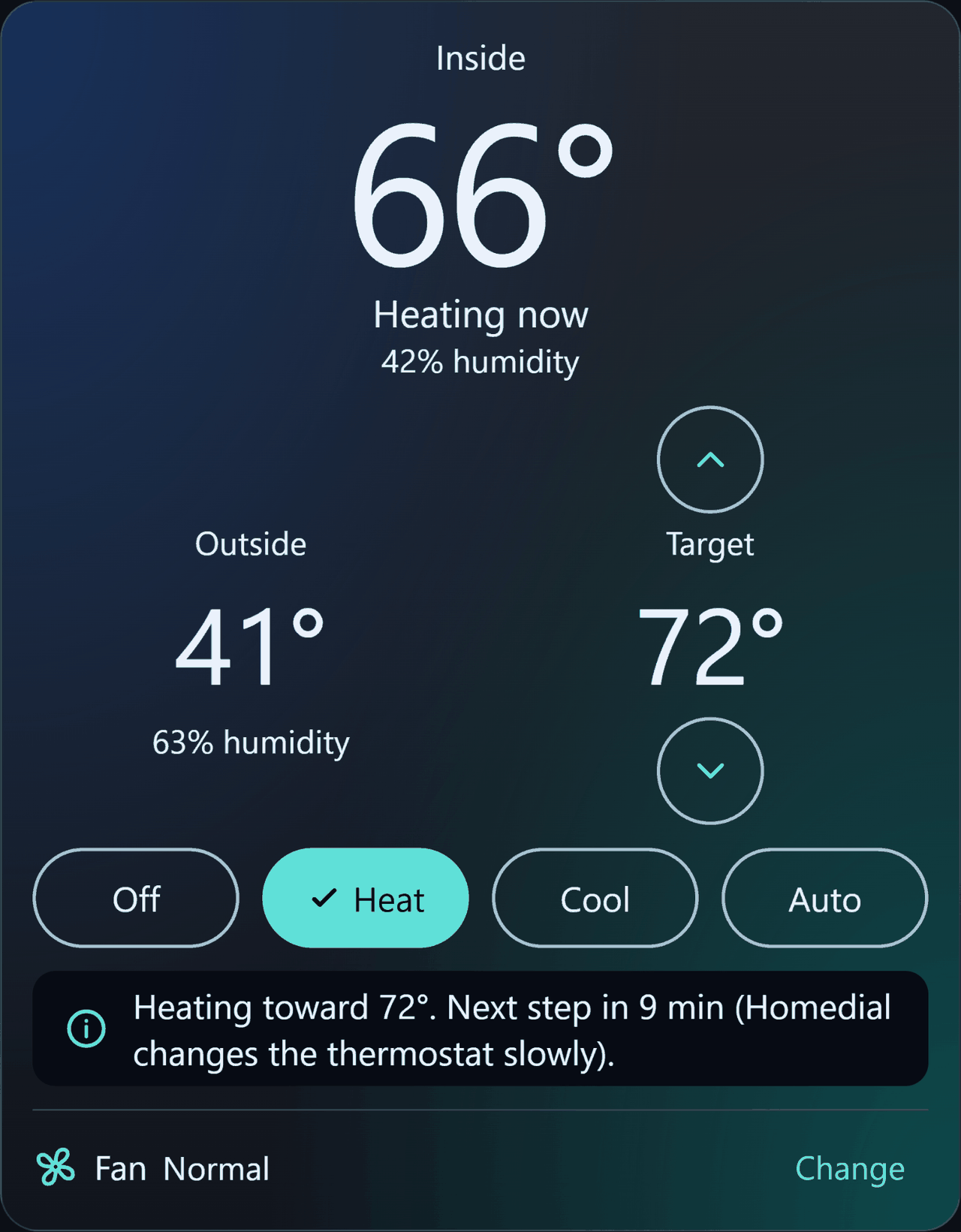
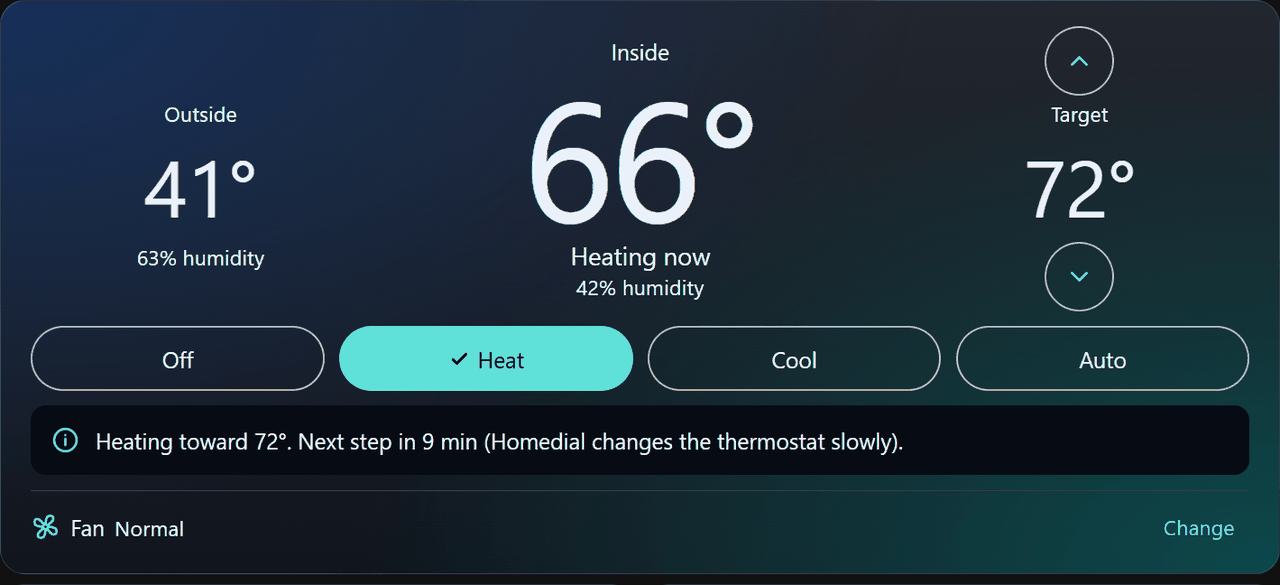
- Explains itself. The Reason sensor says what Homedial is doing and why, for example "Cooling toward 72°. Next step in 7 min (Homedial changes the thermostat slowly)."

Designed with ADHD and autistic people in mind
Homedial was designed with ADHD and autistic people in mind.
- One number to set. You pick one target temperature. Homedial works out the rest from your rooms.
- Plain words. The Reason sensor says what is happening in a sentence, so you don't have to read graphs or work out why the heat came on.
- Slow, steady changes. Homedial changes the thermostat in small steps, to help avoid big swings between too hot and too cold.
- Fewer decisions. With the extras, Auto picks Cool or Heat for you and waits before switching, so it doesn't flip back and forth.
- Calm screens. The Directive Labs themes in Homedial Backdrop use normal capitalization, no italics, no text you need to read under 15 px, and strong contrast. Calm is the lowest-stimulation look.
Tips for ADHD and autistic people
These are practical tips about using your smart home, not medical advice, and they don't diagnose or treat any condition.
How we built it
- Homedial has hundreds of automated tests, including tests of its safety guards.
- Our rule for safety fixes: first write a test that fails, then change the code until it passes.
- Before 1.0.0 shipped, we installed it, upgraded to it, removed it and installed it fresh on a test Home Assistant with a simulated heat pump. Removing it left the simulated heat pump the way it was.
- Homedial has no network code. It runs inside your Home Assistant and sends nothing to Directive Labs.
- So far it has been tested by our own team on a test system. If you try it, tell us how it went: support@directivelabs.app
What you need
- Home Assistant 2026.2 or newer. Tested on 2026.2.3 and 2026.9.4.
- A thermostat that already works in Home Assistant (Cool and/or Heat), and at least one room temperature sensor.
- HACS (built in as Marketplace on Home Assistant 2026.11 or newer), for the easiest install. Homedial Backdrop also needs button-card from it.
Install
The short version: in HACS or Marketplace, add the Homedial repository on GitHub as a custom repository (type Integration), download Homedial, restart Home Assistant, then add the integration. Every step, plus the extras, Backdrop and removal, is in INSTALL.md.
Removing Homedial
Removing Homedial doesn't change your thermostat; whatever it was last told stays until you change it. Afterward, check your thermostat's mode and setpoint: a safety guard may have moved the setpoint to its limit. Steps: INSTALL.md, "Removing Homedial cleanly".
Report a problem
Email support@directivelabs.app. Please include:
- What you did, what you expected, and what happened (with the time).
- The text of the Reason sensor at that time.
- Your Home Assistant version, your thermostat's brand, and °F or °C.
Remove names, addresses and other personal details before you send logs or screenshots.
Homedial supportPrivacy
Homedial runs inside your Home Assistant. It has no network code, sends nothing to Directive Labs, and has no accounts, ads, analytics or tracking. If your thermostat uses its maker's cloud, Home Assistant's own connection for it sends Homedial's changes to the maker.
Privacy policy: directivelabs.app/privacy
License
Homedial is free under the Apache License 2.0. The Directive Labs and Homedial names and logos aren't licensed. See LICENSE and NOTICE. Home Assistant and HACS belong to their owners; Homedial isn't affiliated with or endorsed by them.